
Intero Insight for Vistage
We find the CEOs already connected to the group, check for fit and conflicts, and give the Chair a shortlist.
How it works
Members share their LinkedIn connections. We cross-reference the group and build the shortlist. Members confirm the relationships. The Chair takes it from there.
We've done this successfully by hand with Chairs for years. Intero Insight does the work at scale. It cross-references member networks, checks fit and conflicts, and builds the shortlist for each Chair.
See it
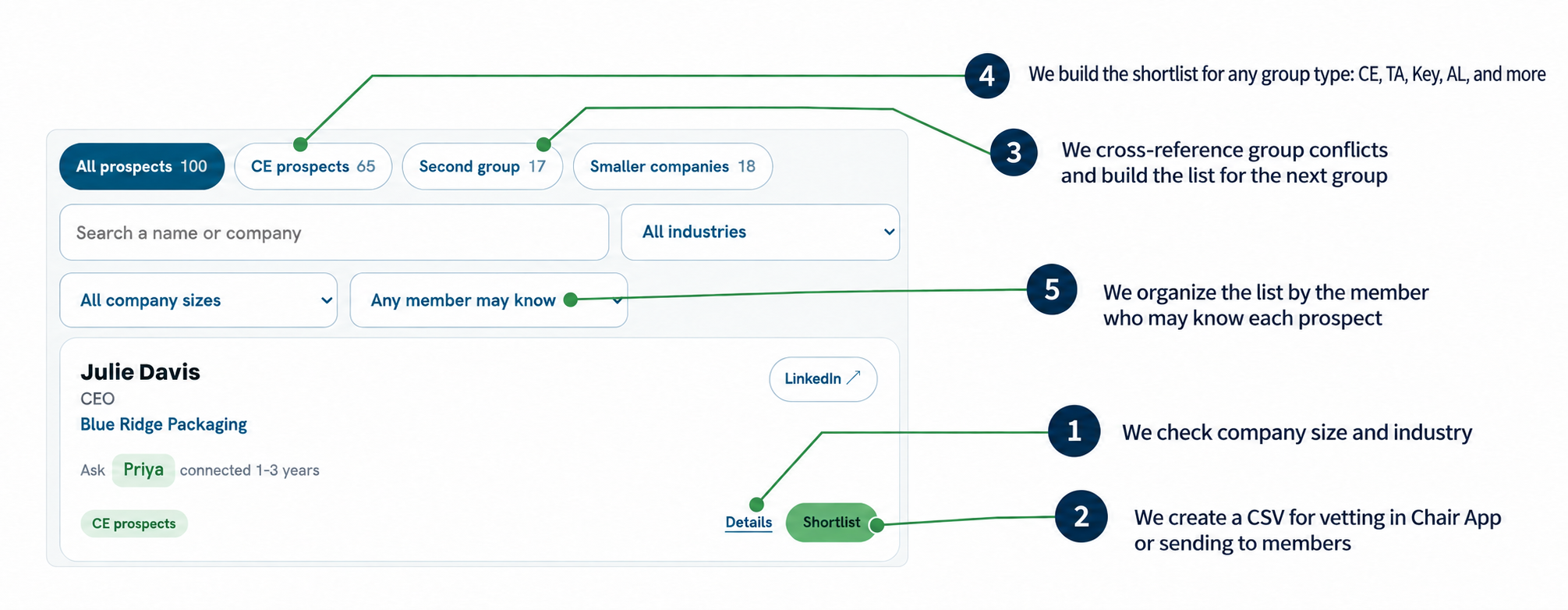
Live Chair View
LinkedIn shows mutual connections one profile at a time. Intero Insight lets a Chair see multiple member networks in one view.
Scenario: You have a 1:1 coming up with Priya.
Choose Priya under Any member may know. You'll see her 14 connections. Select CE prospects to narrow the list to nine. Shortlist them to send ahead, or pull up the list in your 1:1.
Cynthia Wallace appears at the top. Priya, Russ, and Jamal are all connected to her—giving you three members to ask, not one.
Fictional people and companies.
Proposed phased rollout
The four-region pilot
$3,500per region, per month
Up to 20 Chairs per region. Four regions. Every group included. Four months.
Need a larger cohort? Up to 30 Chairs per region for $5,000 per region, per month.
If Vistage moves to a full rollout
$120per Chair, per month
Full rollout pricing is based on a 300-Chair minimum.
From the call
Details
Each browser-based view is password-protected and encrypted. There is no account or raw contact export.
Their network is removed from the instance and the password is changed.
Not in the member or Chair views. We use a language model and proprietary scoring for enrichment. Data is not used for training and is deleted after the view is built.
Members download and share their own LinkedIn connections. We do not scrape LinkedIn.
No. Members may download and share their own data. We never scrape LinkedIn.
No. Members see only their group's view and cannot browse or sort another member's contacts.
We do not share, sell, or use the data beyond building and maintaining the group's view.
No. The Chair has the shortlist and the group view. That's it.
Chairs may continue independently. We delete any instance that does not continue.
Pilot: $3,500 per region per month for up to 20 Chairs, or $5,000 for up to 30. All four regions participate for four months. Full rollout: $120 per Chair per month, with a 300-Chair minimum. Each additional 25-Chair block is $3,000 per month.
Two years, with an out at six months.
Chair calls, group kickstarts, private views, roster changes, regional coordination, and reporting.
Not every member needs to opt in. In the kickstart: download, upload, done. We handle the rest.
The Chair View does. The member view doesn't, on purpose, so members never see into another group.
Yes, once they have four or five committed members. Before that, we can build a view from a handful of their referral partners.
About 30 minutes to start. We handle setup and management.